Skip to content
Smart AC Solutions
  • CategoriesExpand
    • AC Troubleshooting
    • Air ConditionerExpand
      • Portable Air Conditioners
      • Room Air Conditioners
      • Split System Air Conditioners
      • Window Air Conditioners
      • Reviews & Prices
    • Thermostat Solutions
    • Calculator
  • Directory
  • Request HVAC Service
  • Join Our Pro NetworkExpand
    • HVAC BusinessesExpand
      • Residential
      • Commercial
      • Emergency Services
    • Add Business
  • Register
  • Login
  • Forgot Password?
Smart AC Solutions
Troubleshoot

Midea Mini Split Error Codes: Full List & Fixes

ByRalph P. Sita Updated onJune 28, 2026

Midea mini split error codes are short alphanumeric messages (like E1, P5, or F1) shown on the indoor unit display or remote that tell you which fault the system has detected. In general, E-codes point to communication, sensor, or board problems, P-codes indicate protection events such as overheating or pressure issues, and F-codes usually mean a sensor or outdoor-unit fault. Exact meanings vary by model series, so always confirm against the service or installation manual for your specific unit. The reference table and explanations below cover the most common Midea mini split error codes and what to do about each.

Page Contents

Toggle
  • Midea Mini Split Error Codes
  • Midea Mini Split Error Code Reference Table
  • Midea Error Code E1
  • Midea Error Codes for the Outdoor Unit
  • Midea Compressor and Inverter Faults
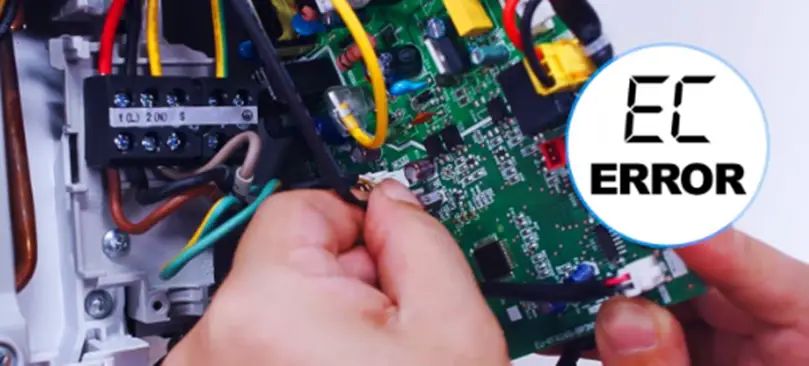
  • Midea Electronics-Related Codes (EC and Similar)
  • How to Find the Error Code on a Midea Air Conditioner
  • How to Reset a Midea Mini Split
  • Midea Mini Split P5 Error Code
  • When to Call a Professional
  • Frequently Asked Questions
    • Are Midea error codes the same on every model?
    • Can I clear a Midea error code myself?
    • Which Midea codes mean I should stop and call a technician?
  • Next Steps
    • Related Articles

Midea Mini Split Error Codes

Midea Mini Split Error Codes

Midea mini split error codes are diagnostic signals that flag a specific malfunction in the system. They range from minor sensor faults you can often clear yourself to serious compressor or refrigerant issues that need a licensed HVAC technician. Important: code letters and numbers are not identical across every Midea model (and Midea also builds units sold under other brand names). The table below reflects the most widely documented meanings, but the definitive source is the manual for your model number.

Midea Mini Split Error Code Reference Table

CodeMost common meaningWhat to do
E0EEPROM / control board memory errorPower-cycle the unit; if it returns, the indoor board likely needs service.
E1Indoor-to-outdoor communication errorCheck the wiring and connections between indoor and outdoor units; call a technician if wiring looks intact.
E2Zero-crossing detection / signal errorOften a power-supply or board issue; power-cycle, then service if persistent.
E3Indoor fan speed out of rangeCheck for obstructions around the fan and clean the unit; service if it continues.
E4 / E5Indoor temperature sensor faultSensor may need reseating or replacement by a technician.
ECRefrigerant leak detection / electronics faultStop using it and call a licensed HVAC tech — refrigerant work is not DIY.
F1Outdoor ambient temperature sensor (T4) faultOutdoor sensor issue; have a technician check or replace it.
P1Freeze / over-voltage protectionUsually a dirty filter or airflow restriction; clean filters and coils.
P4Inverter / compressor drive errorOutdoor inverter board fault — requires a technician.
P5Compressor overheat / high-temperature protectionLet it cool, clear airflow blockages, then restart; service if repeated.

If your display shows a code not listed here, don’t guess at it — look it up in your model’s manual or on Midea’s support troubleshooting page, since the same letters can mean different things on different series.

Midea Error Code E1

On most Midea mini splits, E1 indicates a communication error between the indoor and outdoor units — the two halves of the system aren’t talking to each other correctly. The usual causes are loose or damaged interconnecting wiring, a tripped connection, or a control-board fault.

First, turn the system off at the breaker, wait a minute, and power it back on to clear a one-time glitch. If E1 returns, the wiring between the indoor and outdoor units should be inspected by a qualified technician. (Note: a few older or non-mini-split Midea models use E1 differently, so verify against your manual — this is one reason exact code meanings should always be confirmed for your model.)

Midea Error Codes for the Outdoor Unit

Codes that point to the outdoor unit — including outdoor sensor faults (F-series), inverter/compressor drive errors (such as P4), and refrigerant-related faults (EC) — generally involve the compressor, fan motor, control board, or refrigerant circuit. These are not DIY repairs. If a code traces to the outdoor unit and a simple power-cycle doesn’t clear it, contact a licensed HVAC technician with your model number so they can diagnose the correct cause.

Midea Compressor and Inverter Faults

Compressor-related codes can stem from a failing compressor or capacitor, low refrigerant, an overloaded or low-voltage power supply, or inverter board problems. Because these involve high-voltage and sealed refrigerant components, troubleshooting and repair should be handled by an HVAC professional. Their diagnosis identifies the true root cause rather than swapping parts at random.

Midea Electronics-Related Codes (EC and Similar)

An EC-type code points to an electronics or refrigerant-detection issue — possibly faulty wiring, an overloaded circuit, or a refrigerant leak. Check your manual for any reset procedure and visually inspect accessible connections for obvious wear, but do not open sealed refrigerant lines. If the code persists, a professional technician should diagnose and repair it before the unit is run again.

How to Find the Error Code on a Midea Air Conditioner

How to Find Error Code on Midea Air Conditioner?
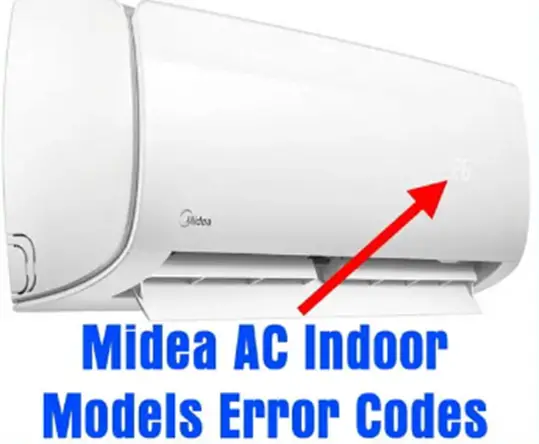
On most Midea mini splits, the error code appears automatically on the indoor unit’s LED display or flashes via its indicator lights when a fault occurs. It may also show on the wireless remote’s screen. If nothing is displayed but the unit is misbehaving, consult the manual for your model — some units flash a light pattern rather than a text code, and the manual explains how to read it.

Avoid pressing undocumented button combinations to “force” a diagnostic menu, since these vary by model and can change settings. The reliable path is the display readout plus your model’s manual or Midea support.

How to Reset a Midea Mini Split

A reset clears many one-time faults. The safest general method:

  • Turn the unit off using the remote, then switch off power at the dedicated breaker or disconnect.
  • Wait at least 1-3 minutes so the control board and capacitors fully discharge.
  • Clean or check the air filter and clear any debris from the indoor and outdoor coils.
  • Restore power and turn the unit back on. The fault should clear if it was temporary.
  • If your remote or model has a specific reset button or combination, follow the manual exactly.

If the same code reappears right after a reset, that’s a sign of a real fault that needs diagnosis rather than another reset.

Midea Mini Split P5 Error Code

The P5 code on many Midea mini splits is a high-temperature / compressor overheat protection event: the system shuts down to protect the compressor when it gets too hot. Restart the unit after it cools, then address airflow — overheating is frequently caused by a dirty filter, blocked coils, or restricted airflow around the outdoor unit. Clean the filter, clear leaves and debris from the condenser, and make sure nothing is blocking intake or exhaust. If P5 keeps returning, have a technician check refrigerant charge and the compressor, since note that exact P-code meanings can differ by model.

When to Call a Professional

Handle these yourself: cleaning filters and coils, clearing airflow blockages, and a single power-cycle reset. Call a licensed HVAC technician for anything involving refrigerant, the compressor, the inverter/control boards, sensor replacement, or any code that returns immediately after a reset. Have your model number ready so they can match the exact code meaning to your unit.

Frequently Asked Questions

Are Midea error codes the same on every model?

No. The E/P/F families follow general patterns, but exact meanings differ between model series, and Midea also manufactures units sold under other brand names. Always confirm a code against the manual for your specific model number.

Can I clear a Midea error code myself?

Often yes for minor faults: power-cycle the unit at the breaker, wait a few minutes, clean the filter, and restart. If the code comes right back, it indicates a real fault that needs professional diagnosis.

Which Midea codes mean I should stop and call a technician?

Any code tied to refrigerant (such as EC), the compressor, or the inverter/control boards, plus any code that recurs immediately after a reset. These involve high voltage or sealed refrigerant systems that aren’t safe DIY repairs.

Next Steps

Use the reference table to identify your code, try the safe steps — power-cycle, clean filters, clear airflow — and confirm the exact meaning in your model’s manual. For compressor, refrigerant, inverter, or recurring faults, bring in a licensed technician with your model number. Acting on the right code early protects both your comfort and the life of the system.

5/5 - (1 vote)
Ralph P. Sita
Author: Ralph P. Sita

Ralph P. Sita is a seasoned professional with deep roots in both the HVAC and tech industries. His family’s business, Ralph P. Sita, Inc., is a locally owned and operated HVAC contractor with over 42 years of experience, serving the DC, Maryland, and Virginia areas. The company specializes in residential, commercial, and industrial heating, ventilation, and air conditioning services, offering everything from installation and maintenance to custom ductwork and indoor air quality solutions -www.ralphpsita.com. A former CPA, he spent the last decade as co-founder and co-CEO at Cybrary, a leading platform for cybersecurity and IT training. Cybrary became the largest, most well-known cybersecurity training businesses in the industry under his leadership. Smart AC Solutions is an opportunity to give back to the HVAC community by providing reliable, actionable information on all things heating and cooling.

Related Articles:

  1. Hisense Air Conditioner Error Codes: Full List & Fixes
  2. Fujitsu Mini Split Error Codes with Solutions
  3. Carrier Mini Split Troubleshooting – Easy Fixes
  4. Mitsubishi Mini Split Leaking Water? Causes & Fixes
Ralph P. Sita

Ralph P. Sita is a seasoned professional with deep roots in both the HVAC and tech industries. His family’s business, Ralph P. Sita, Inc., is a locally owned and operated HVAC contractor with over 42 years of experience, serving the DC, Maryland, and Virginia areas. The company specializes in residential, commercial, and industrial heating, ventilation, and air conditioning services, offering everything from installation and maintenance to custom ductwork and indoor air quality solutions -www.ralphpsita.com.

A former CPA, he spent the last decade as co-founder and co-CEO at Cybrary, a leading platform for cybersecurity and IT training. Cybrary became the largest, most well-known cybersecurity training businesses in the industry under his leadership.

Smart AC Solutions is an opportunity to give back to the HVAC community by providing reliable, actionable information on all things heating and cooling.

Linkedin

Try our new Smart AC Solutions GPT

Description of Smart AC Solutions GPT and link to access.

  • Mastering Whole-Home Ventilation Rate Calculations: A Guide to ASHRAE 62.2 Standards
    by Ralph P. Sita
  • Understanding the Ozone-Based Air Purifier Risks in Occupied Spaces
    by Ralph P. Sita
  • Duct Pressurization Testing (Duct Blaster) Explained: What You Need to Know
    by Ralph P. Sita
  • Optimize Your HVAC Scheduler for Utility Time-of-Use Rates and Slash Energy Bills
    by Ralph P. Sita
  • Ensuring Home Energy Management System (HEMS) Compatibility for Your Smart Home
    by Ralph P. Sita
  • Fresh Air Damper Sizing Guide for Tight Construction: Ensuring Optimal Ventilation
    by Ralph P. Sita

Sites we love:
TrainACE

Facebook Twitter Pinterest YouTube

SmartACSolutions is your go-to source for the latest in heating and air conditioning news, tips, and expert advice.

  • About Us
  • Contact Us
  • Disclaimer
  • Privacy Policy
  • Sitemap

© 2026 Smart AC Solutions । DMCA Protected

SmartACSolutions.com is a property of FieldBin Inc.

Change Location
Find awesome listings near you!
  • Categories
    • AC Troubleshooting
    • Air Conditioner
      • Portable Air Conditioners
      • Room Air Conditioners
      • Split System Air Conditioners
      • Window Air Conditioners
      • Reviews & Prices
    • Thermostat Solutions
    • Calculator
  • Directory
  • Request HVAC Service
  • Join Our Pro Network
    • HVAC Businesses
      • Residential
      • Commercial
      • Emergency Services
    • Add Business
  • Register
  • Login
  • Forgot Password?