Skip to content
Smart AC Solutions
  • CategoriesExpand
    • AC Troubleshooting
    • Air ConditionerExpand
      • Portable Air Conditioners
      • Room Air Conditioners
      • Split System Air Conditioners
      • Window Air Conditioners
      • Reviews & Prices
    • Thermostat Solutions
    • Calculator
  • Directory
  • Request HVAC Service
  • Join Our Pro NetworkExpand
    • HVAC BusinessesExpand
      • Residential
      • Commercial
      • Emergency Services
    • Add Business
  • Register
  • Login
  • Forgot Password?
Smart AC Solutions
Thermostat Solutions

Can a Broken Thermostat Cause AC Not to Work?

ByRalph P. Sita Updated onJune 29, 2026

Yes, a broken thermostat can cause your AC not to work. The thermostat is the control center for your air conditioner: it senses room temperature and signals the system to turn the cooling on and off. If the thermostat loses power, loses its connection to the unit, or reads temperature incorrectly, the AC may never get the signal to start, may run nonstop, or may short-cycle. The good news is that a faulty thermostat is one of the cheaper and more common causes of an AC that won’t run, and it is often fixed by fresh batteries, a tripped breaker reset, or a straightforward replacement.

Before you assume the worst about your compressor or refrigerant, rule out the thermostat first. Below we cover how to tell whether the thermostat is the culprit, the quick checks you can do yourself, and when to bring in a professional. Any work involving the AC’s wiring or low-voltage connections beyond the thermostat itself should be left to a licensed HVAC technician.

Can a Broken Thermostat Cause Ac Not to Work

Page Contents

Toggle
  • How Do I Know If My AC Thermostat Is Broken?
  • AC Won’t Start, Won’t Turn On, or Thermostat Broken
  • Thermostat Troubleshooting Steps
  • When to Replace the Thermostat vs. Call a Pro
  • Frequently Asked Questions
    • Related Articles

How Do I Know If My AC Thermostat Is Broken?

A few clear signs point to a broken AC thermostat. Watch for these:

  • The display is blank, dim, or flickering, which usually means dead batteries or no power.
  • The AC will not turn on even though the thermostat is set well below room temperature.
  • The system runs constantly and never shuts off, or short-cycles on and off rapidly.
  • The room temperature does not match what the thermostat displays.
  • Changing the setpoint produces no response from the unit.

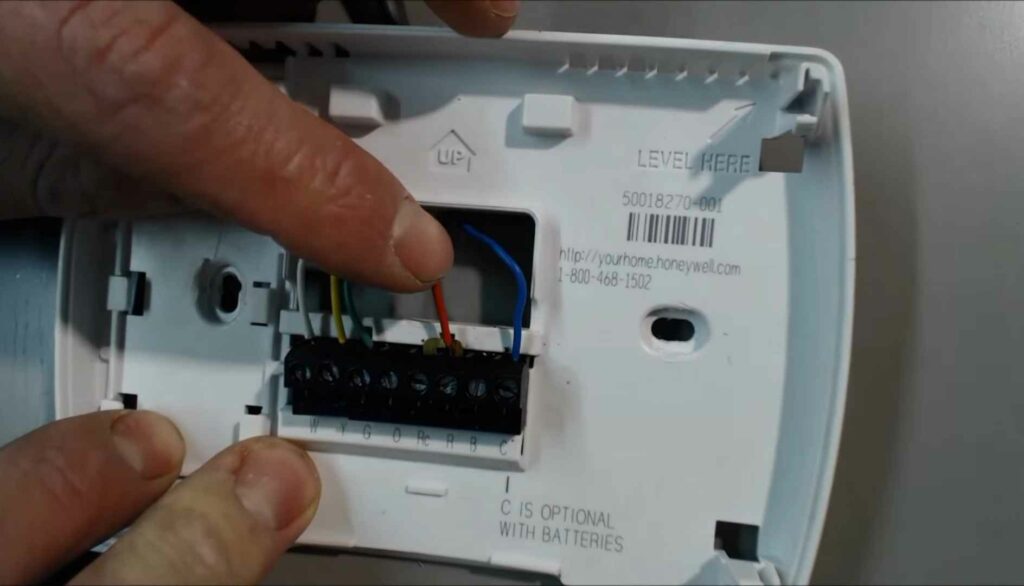
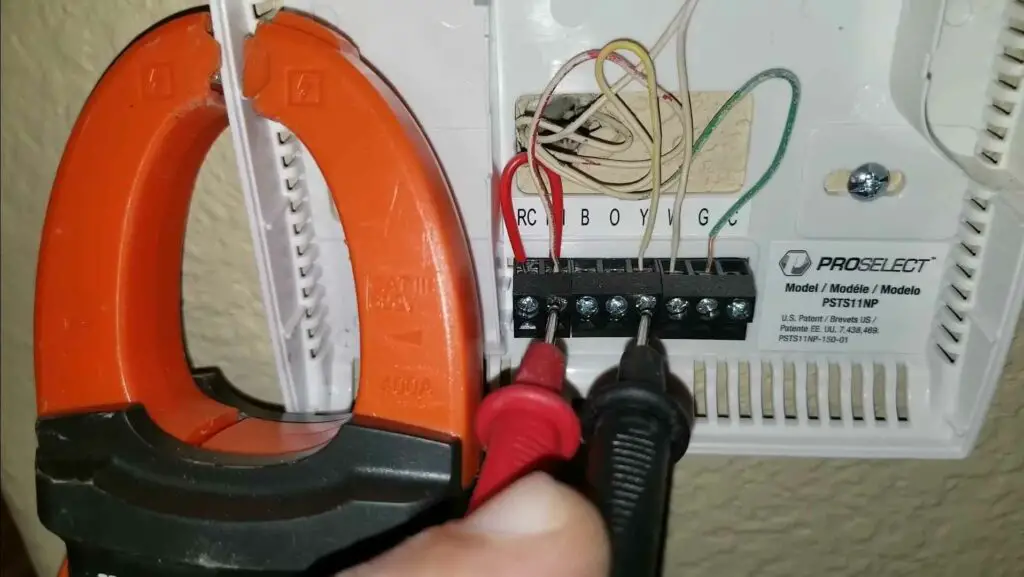
To confirm, start with the batteries. If they are dead or dying, replace them, because that alone resolves many “dead” thermostats. Next, with the power off at the breaker, check that the thermostat wires are seated and not loose or corroded at the terminals. Inspect the thermostat body for cracks or damage, then restore power, set a temperature several degrees below the room reading, and listen for the system to respond. If none of these steps brings it back to life, the thermostat likely needs to be replaced.

How Do I Know If My Ac Thermostat is Broken

A quick way to test responsiveness: set the thermostat to “cool,” then lower the target temperature below the current room temperature. A working thermostat should trigger the system within a minute or two (some have a built-in delay to protect the compressor). If nothing happens and the display is fine, the issue may be wiring or the unit itself, which is a job for a technician.

AC Won’t Start, Won’t Turn On, or Thermostat Broken

Thermostat Troubleshooting Steps

Most thermostat problems are quick to fix. Work through these in order before calling for service:

  1. Replace the batteries. This is the single most common fix. A blank or dim display almost always means weak batteries.
  2. Confirm the unit has power. Check that the circuit breaker for the AC and air handler has not tripped, and that the furnace or air-handler door switch is closed. Reset a tripped breaker once; if it trips again, stop and call a pro.
  3. Check the settings. Make sure the mode is set to “cool,” the fan is on “auto,” and the target temperature is below the current room temperature. In “auto” mode the system only runs when needed.
  4. Clean or replace the air filter. A clogged filter restricts airflow and can cause the system to overheat, freeze, or shut down, which can look like a thermostat fault.
  5. Inspect the wiring. With power off, confirm the thermostat wires are tight at the terminals. Do not attempt repairs on damaged low-voltage wiring yourself; have a technician handle it.

If the thermostat responds normally but the AC still will not cool, the problem is downstream, in the contactor, capacitor, compressor, or refrigerant charge. Those require a licensed technician and, in the case of refrigerant, are not DIY repairs.

When to Replace the Thermostat vs. Call a Pro

Replacing a basic thermostat is a manageable DIY job if you are comfortable labeling and reconnecting a few low-voltage wires and you turn off power first. Upgrading to a smart or programmable model can also improve comfort and lower energy bills. Call a professional if the breaker keeps tripping, you find scorched or damaged wiring, the new thermostat still does not control the system, or the AC runs but blows warm air, since those point to issues beyond the thermostat.

Frequently Asked Questions

Can a broken thermostat cause the AC not to work? Yes. The thermostat tells the AC when to run. If it loses power, has dead batteries, reads temperature wrong, or has a bad connection, the system may not start, may run nonstop, or may short-cycle. It is one of the most common and least expensive causes to fix.

How do I know if my AC thermostat is broken? Look for a blank or flickering display, an AC that won’t respond to setpoint changes, constant running or short-cycling, or a room temperature that doesn’t match the display. Start by replacing the batteries and checking the breaker before assuming the thermostat is failed.

Will the AC stop working if the thermostat is bad? It can. A failed thermostat may not signal the AC to turn on at all, or it may keep it running longer than needed, which overworks the system. Confirming and replacing a bad thermostat usually restores normal operation.

Does the thermostat control the air conditioner? Yes. The thermostat is what tells the AC when to turn on and off based on the temperature you set. Set it too low and the system runs almost continuously; set it above room temperature in cool mode and it never starts.

5/5 - (1 vote)
Ralph P. Sita
Author: Ralph P. Sita

Ralph P. Sita is a seasoned professional with deep roots in both the HVAC and tech industries. His family’s business, Ralph P. Sita, Inc., is a locally owned and operated HVAC contractor with over 42 years of experience, serving the DC, Maryland, and Virginia areas. The company specializes in residential, commercial, and industrial heating, ventilation, and air conditioning services, offering everything from installation and maintenance to custom ductwork and indoor air quality solutions -www.ralphpsita.com. A former CPA, he spent the last decade as co-founder and co-CEO at Cybrary, a leading platform for cybersecurity and IT training. Cybrary became the largest, most well-known cybersecurity training businesses in the industry under his leadership. Smart AC Solutions is an opportunity to give back to the HVAC community by providing reliable, actionable information on all things heating and cooling.

Related Articles:

  1. How Do I Know If My AC Is Broken? Signs to Call a Pro
  2. Will Low Antifreeze Cause Ac Not to Work?
  3. Will Low Coolant Cause Ac Not to Work
  4. Does Nest Thermostat Work With Any Air Conditioning? Finding the Perfect Match
Ralph P. Sita

Ralph P. Sita is a seasoned professional with deep roots in both the HVAC and tech industries. His family’s business, Ralph P. Sita, Inc., is a locally owned and operated HVAC contractor with over 42 years of experience, serving the DC, Maryland, and Virginia areas. The company specializes in residential, commercial, and industrial heating, ventilation, and air conditioning services, offering everything from installation and maintenance to custom ductwork and indoor air quality solutions -www.ralphpsita.com.

A former CPA, he spent the last decade as co-founder and co-CEO at Cybrary, a leading platform for cybersecurity and IT training. Cybrary became the largest, most well-known cybersecurity training businesses in the industry under his leadership.

Smart AC Solutions is an opportunity to give back to the HVAC community by providing reliable, actionable information on all things heating and cooling.

Linkedin

Try our new Smart AC Solutions GPT

Description of Smart AC Solutions GPT and link to access.

  • Mastering Whole-Home Ventilation Rate Calculations: A Guide to ASHRAE 62.2 Standards
    by Ralph P. Sita
  • Understanding the Ozone-Based Air Purifier Risks in Occupied Spaces
    by Ralph P. Sita
  • Duct Pressurization Testing (Duct Blaster) Explained: What You Need to Know
    by Ralph P. Sita
  • Optimize Your HVAC Scheduler for Utility Time-of-Use Rates and Slash Energy Bills
    by Ralph P. Sita
  • Ensuring Home Energy Management System (HEMS) Compatibility for Your Smart Home
    by Ralph P. Sita
  • Fresh Air Damper Sizing Guide for Tight Construction: Ensuring Optimal Ventilation
    by Ralph P. Sita

Sites we love:
TrainACE

Facebook Twitter Pinterest YouTube

SmartACSolutions is your go-to source for the latest in heating and air conditioning news, tips, and expert advice.

  • About Us
  • Contact Us
  • Disclaimer
  • Privacy Policy
  • Sitemap

© 2026 Smart AC Solutions । DMCA Protected

SmartACSolutions.com is a property of FieldBin Inc.

Change Location
Find awesome listings near you!
  • Categories
    • AC Troubleshooting
    • Air Conditioner
      • Portable Air Conditioners
      • Room Air Conditioners
      • Split System Air Conditioners
      • Window Air Conditioners
      • Reviews & Prices
    • Thermostat Solutions
    • Calculator
  • Directory
  • Request HVAC Service
  • Join Our Pro Network
    • HVAC Businesses
      • Residential
      • Commercial
      • Emergency Services
    • Add Business
  • Register
  • Login
  • Forgot Password?