If the breaker trips, it could be a sign that the thermostat is bad. Another way to tell if the thermostat is bad is to check the AC unit’s coils. If the coils are hot to the touch, it could be a sign that the thermostat is bad.
There are a few more things you can look at. First, check the batteries. If they are old or dead, they may be the culprit.
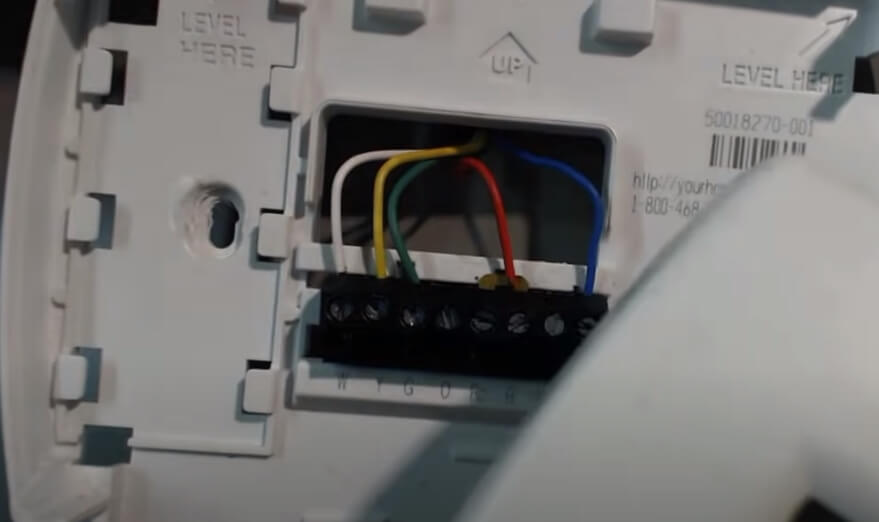
Next, check the wiring to make sure all connections are tight. If everything looks good there, the problem may be with the thermostat itself.
In that case, either you should be called an HVAC professional or have to learn the diagnosis and fixing process of the thermostat.
How Do I Know If My AC Thermostat Is Bad? Expert Tips
If you find yourself questioning the functionality of your air conditioning thermostat, there are certain indicators that can help you determine whether it is indeed faulty.
Firstly, if your thermostat fails to accurately regulate the temperature, resulting in inconsistent or uncomfortable cooling, it may be a sign of a malfunction.
Additionally, if your AC unit fails to turn on or off at the desired temperature, it could be indicative of a faulty thermostat. Irregular temperature fluctuations or an unresponsive display are also red flags.
Seeking the advice of a professional HVAC technician is recommended in such cases, as they possess the expertise to diagnose and rectify any issues with your thermostat, ensuring optimal performance of your air conditioning system.
What are the symptoms of a bad AC thermostat? Diagnose It?
The symptoms of a bad AC thermostat can vary depending on the type of thermostat that is installed in the AC unit.
The most common symptom of a bad AC thermostat is the AC unit not cooling the home or office space sufficiently.
Other symptoms can include the AC unit cycling on and off more frequently than normal or the AC unit not turning on at all.
If the AC thermostat is not working properly, it is important to have it repaired or replaced as soon as possible to prevent further damage to the AC unit.
How to tell if thermostat is bad?
If you suspect that your thermostat might be bad, there are several signs you can look for to help confirm the issue. Here are some common indicators of a faulty thermostat:
- Temperature Inconsistencies: If you notice that your home is either too hot or too cold compared to the thermostat setting, it could be a sign of a malfunctioning thermostat.
- Unresponsive Controls: When you try to adjust the temperature setting, and the thermostat does not respond or takes a long time to respond, it may be malfunctioning.
- Constant Running: A thermostat that fails to signal the HVAC system to turn off, resulting in continuous heating or cooling, can indicate a faulty thermostat.
- Rapid Cycling: If the heating or cooling system turns on and off too frequently, it might be due to a faulty thermostat.
- No Power: Check if the thermostat display is blank, indicating that it’s not receiving any power. This could be due to a dead battery or a larger issue with the thermostat.
- Incorrect Readings: If the temperature displayed on the thermostat is significantly different from the actual room temperature, it could be a sign of a faulty sensor or calibration problem.
- HVAC System Doesn’t Start: When the thermostat is set correctly, but the heating or cooling system doesn’t start, it could be due to a malfunctioning thermostat not sending the proper signals.
- Short-Cycling: If your HVAC system turns on and off rapidly without completing a full cycle, it might be caused by a faulty thermostat.
What are the symptoms of a bad wall thermostat?
A malfunctioning or bad wall thermostat can lead to a host of issues within a heating or cooling system. Identifying the symptoms of a faulty thermostat is crucial in order to ensure optimal performance and energy efficiency.
One common indication of a problematic thermostat is inconsistent temperature control, with the room feeling either excessively hot or cold.
Another symptom may present as frequent cycling of the HVAC system, causing it to turn on and off frequently, leading to increased energy consumption.
Moreover, if the thermostat fails to respond to temperature adjustments or displays inaccurate readings, it is a clear sign of malfunction.
It is paramount to promptly address these symptoms to avoid further damage to the HVAC system and maintain a comfortable indoor environment.
How do I test my AC thermostat?
If your air conditioner isn’t cooling your home as it should, one of the first things you’ll want to check is the thermostat. A faulty thermostat can cause your AC unit to cycle on and off more frequently than normal or not turn on at all. Testing your AC thermostat is a relatively simple process that can be completed in just a few minutes.
To test your AC thermostat, start by turning off the power to your AC unit at the breaker box. Once the power is off, remove the thermostat cover and remove the two wires from the terminals. Using a multimeter, set it to the ohms setting and touch one lead to each of the terminals.
If the multimeter reads infinity, then the thermostat is working properly. If the multimeter reads zero or a low number, then the thermostat is not working properly and will need to be replaced. Once you’ve determined that the thermostat is not working properly, you’ll need to replace it.
To do this, simply purchase a new thermostat and follow the instructions that come with it. Once the new thermostat is in place, turn the power back on to the AC unit and test it out to make sure it’s cooling properly.
How to Fix Bad AC Thermostat? Tips and Tricks?
When faced with a malfunctioning AC thermostat, it is essential to approach the task with a systematic and professional mindset.
Firstly, ensure that the thermostat is receiving power by checking the circuit breaker and replacing any blown fuses. If the issue persists, recalibrate the thermostat by removing its cover and adjusting the temperature sensor.
Clean any accumulated dust or debris that may hinder its functionality. Additionally, ensure that the thermostat wires are securely connected to their respective terminals.
If these steps fail to resolve the problem, it is advisable to consult a certified HVAC technician for a thorough inspection and potential replacement of the thermostat.
Remember, maintaining a professional approach and seeking expert assistance will ensure optimal performance and longevity of your AC system.
How do you know when you need a new thermostat?
If your home is not heated or cooled to your desired temperature, it may be time for a new thermostat. Other signs that you may need a new thermostat include:
-Your energy bills have increased even though you haven’t changed your thermostat settings
-Your thermostat is outdated or not programmed correctly
-You have hot and cold spots in your home
How do you know if your thermostat has gone out?
There are several signs that your thermostat may have gone out.
One is if your home suddenly feels warmer or cooler than it should.
Another is if the furnace or air conditioner seems to be cycling on and off more frequently than usual.
Finally, if your energy bills have spiked recently, that could be a sign that your thermostat isn’t working properly.
When to replace the home thermostat?
If your home thermostat is more than 10 years old, it’s time to replace it. A newer model will be more accurate and may help you save on your energy bill. If you’re not sure when your thermostat was installed, take a look at the label on the back.
The date of manufacture should be listed. If your thermostat is showing signs of wear, such as cracks in the housing or a loose wire, it’s also time to replace it. A new thermostat will cost between $50 and $100, depending on the features you choose.
Installation is usually straightforward and can be done by a handy homeowner. If you have a central heating and cooling system, a new thermostat can be programmed to save energy when you’re away from home or asleep. Look for a model with a “vacation” or “hold” setting.
For more tips on saving energy at home, visit the U.S. Department of Energy’s website.
Furnace thermostat problems
If you’re having trouble with your furnace thermostat, there are a few things you can check to see if it’s the problem.
First, make sure the batteries are fresh. If the batteries are good, then check the wiring to see if there are any loose connections.
Finally, if all else fails, you may need to replace the thermostat itself.
Can a bad thermostat cause AC not to cool?
If your AC isn’t cooling properly, it could be due to a number of different factors. One possibility is that your thermostat is not working properly. A bad thermostat can cause your AC to not cool properly for several reasons.
First, if the thermostat is not reading the temperature correctly, it may not turn the AC on when it should. Additionally, even if the AC is turned on, the thermostat may not be sending the correct signal to the AC unit, causing it to run less efficiently.
How to Replace Thermostat?
If your home feels drafty or the temperature isn’t consistent from room to room, it might be time to replace your thermostat. A new thermostat can not only make your home more comfortable, but it can also help you save money on your energy bill. Here’s how to replace a thermostat in eight easy steps.
- Turn off the power to your furnace or air conditioner. The thermostat will be connected to either your furnace or your air conditioner, so you’ll need to turn off the power to one of these units.
- Remove the old thermostat. Use a screwdriver to remove the faceplate of the old thermostat. Then, carefully disconnect the wires from the terminals.
- Connect the new thermostat. Follow the instructions that came with your new thermostat to connect the wires to the appropriate terminals.
- Mount the new thermostat. Once the wires are connected, you can mount the new thermostat on the wall. Turn on the power to your furnace or air conditioner.
- Set the temperature. Set the temperature on your new thermostat to the same temperature as your old thermostat.
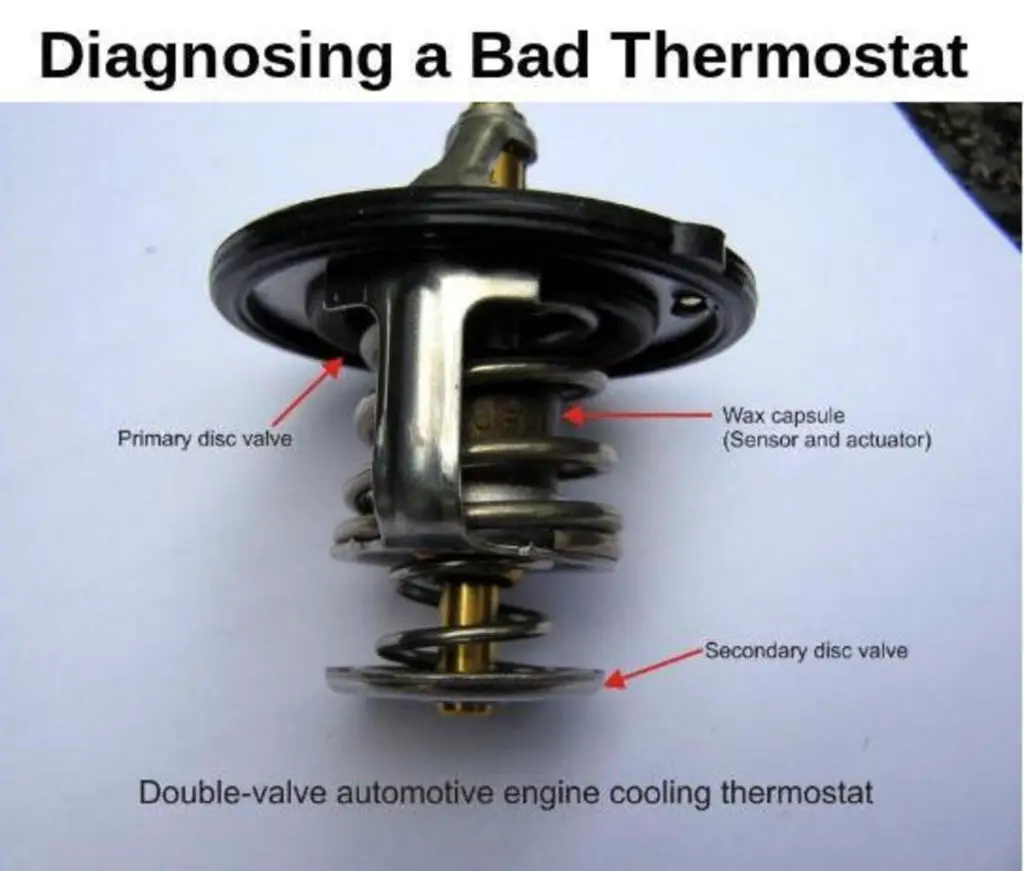
Broken thermostat car
If your car’s thermostat is broken, it can cause several problems. The thermostat is responsible for regulating the flow of coolant through the engine, and if it’s not working properly, the engine can overheat. This can lead to serious engine damage, and in some cases, it can even cause the engine to catch fire.
If you think your car’s thermostat may be broken, it’s important to take it to a mechanic right away. They will be able to diagnose the problem and make the necessary repairs. In the meantime, you can try to keep your engine cool by driving at a lower speed and avoiding stop-and-go traffic.
If you’re stranded on the side of the road with an overheated engine, the best thing to do is to call a tow truck. Trying to fix the problem yourself is not worth the risk, and, likely, you’ll just end up making things worse.
Broken thermostat house
If your home’s thermostat is broken, it can be a real hassle. Not only will you have to contend with the cold or heat, depending on the season, but you’ll also have to shell out money to repair or replace the thermostat. In the meantime, there are a few things you can do to minimize the discomfort and make do with a broken thermostat.
In the winter, dress in layers and use blankets to keep warm. Make sure to seal off any drafts in your home, and open the blinds during the day to let in some natural heat. You can also try using a space heater, but be sure to keep it away from any flammable materials.
In the summer, try to stay cool by staying in the shade, using fans, and drinking lots of fluids. Avoid strenuous activity, and dress in light, loose-fitting clothing. If possible, spend time in air-conditioned buildings.
If your thermostat is broken, it’s important to take steps to minimize your discomfort. But be sure to call a professional to repair or replace the thermostat as soon as possible.
Troubleshooting if a Thermostat is BAD: Explained!
Symptoms of bad central aC thermostat
If your central air conditioner isn’t working properly, one of the first things you should check is the thermostat. A faulty thermostat can cause a variety of AC problems, including a unit that doesn’t turn on, one that doesn’t cool properly, or one that cycles on and off too frequently.
There are several signs that your central AC thermostat may be going bad.
If you notice any of these symptoms, it’s a good idea to call a professional AC repair technician for further diagnosis and repair.
1. The AC unit won’t turn on. If your AC unit won’t turn on at all, the first thing you should check is the thermostat.
It’s possible that the batteries in your thermostat are dead, or that a wire has come loose. If the thermostat is the problem, it will need to be replaced.
2. The AC unit turns on, but it doesn’t cool the house: If the AC unit turns on but doesn’t seem to be cooling the house properly, there are a few potential causes. One is that the thermostat is set to the wrong temperature. Another possibility is that the air filter is dirty and needs to be replaced.
3. Finally, the AC unit itself may be low on refrigerant.
4. The AC unit turns on and off frequently.
How to check if boiler thermostat is working?
If your boiler is not working, one of the first things you should check is the thermostat. A faulty thermostat can prevent your boiler from heating up, which can be a frustrating problem on a cold day. Here are some steps you can take to check if your boiler thermostat is working:
1. Check the batteries. If your thermostat uses batteries, the first thing you should do is check that they are still working. If the batteries are dead, replace them and see if that fixes the problem.
2. Check the wiring. If your thermostat is hardwired, make sure that all the wires are securely connected. Loose wires can sometimes cause problems.
3. Check the settings. Make sure that the thermostat is set to the correct temperature. If it is set too low, the boiler will not turn on.
4. Check the pilot light. If your boiler has a pilot light, make sure that it is lit. If it is not, you may need to relight it.
5. Check the pressure. If your boiler has a pressure gauge, make sure that the pressure is within the normal range. If it is not, you may need to bleed the boiler.
If you have followed all of these steps and your boiler still will not turn on, there may be a more serious problem.
Conclusion
If you think your AC thermostat might be bad, there are a few things you can check to be sure. First, see if the thermostat is set to the correct temperature. If it is, then check to see if the AC is actually blowing out cool air.
If it’s not, then the thermostat is probably bad and you’ll need to replace it.
